
ThorFortune Registration, Login and KYC Verification - Complete Account Guide
This page covers the full account lifecycle at ThorFortune: opening an account, verifying an email address, signing in, resetting a forgotten password, enabling two-factor authentication, passing identity verification before a first withdrawal, managing limits and responsible gambling tools, and eventually closing an account if needed. It is not a single-topic page - it is the reference for everything that happens on the account management side of ThorFortune.
The sign-up button sits at the top right of the desktop interface and in the centre of the mobile bottom navigation bar, which is visible without scrolling on any ThorFortune page. That placement reflects how central account creation is to the platform's design - but the registration process itself requires more than just clicking that button. Currency selection at signup affects which bonuses are available. The email address used becomes the login credential. And personal details entered during registration feed directly into the KYC verification check that gates withdrawals.
Where source data for specific UI details is confirmed - registration fields, login behavior, 2FA location - this page uses those specifics. Where screenshots of a specific flow were not available or where ThorFortune has not published a detail (such as the exact password recovery UI), this page describes the process based on what is known and notes the gap where it exists.
ThorFortune Account Reference: Key Parameters
| Parameter | Value |
|---|---|
| Minimum age | 18 years |
| Registration fields | Email, password, full name, date of birth, country, currency |
| Social login (Google / Facebook) | Not confirmed in published source material |
| Email confirmation required | Yes - activation link sent after form submission |
| Login credentials | Email address and password |
| Remember Me option | Available on login page |
| Two-factor authentication (2FA) | Optional; configured in Profile security settings |
| Password recovery method | Email recovery link (exact UI not confirmed by screenshot) |
| KYC trigger | Before first withdrawal is processed |
| KYC documents required | Government-issued ID, utility bill (proof of address), payment method proof |
| Optional KYC step | Selfie with ID document or short video check, at ThorFortune's discretion |
| KYC processing time | A few hours to 24 hours after complete submission |
| Self-exclusion | Yes - temporary or permanent; in Profile settings |
| Account deletion | Possible via permanent self-exclusion or formal support request |
| Promo code at registration | Not confirmed in form; codes typically entered in cashier at deposit |
ThorFortune Casino Registration: How to Create Your Account
Creating a ThorFortune account takes a few minutes from any device. The mobile interface surfaces the Sign Up button centrally in the bottom navigation bar, making it reachable without scrolling from any page. On desktop, it sits in the top-right corner alongside the Login button. Both routes open the same registration form.
ThorFortune does not run a full identity check during registration - the form collects the data needed to create the account, but document verification happens later, triggered by the first withdrawal request rather than by sign-up. This means deposits and game play are available immediately after email confirmation, without waiting for KYC processing.
- Open the ThorFortune site in your browser on desktop or mobile and tap the Sign Up button - on mobile, it appears as a prominent option in the centre of the bottom navigation bar; on desktop, it sits in the top-right corner of every page.
- Complete the registration form by entering your email address, a secure password, your full name, date of birth, country of residence, and preferred account currency. All fields must match the identity documents you will eventually submit for KYC, so accuracy here matters from the start.
- Read the Terms and Conditions and confirm acceptance. ThorFortune also requires age confirmation - you are confirming you are 18 or older. Do not create an account if you are under the legal gambling age in your country.
- Submit the form and wait for ThorFortune's confirmation email to arrive. The account exists after submission, but certain functions remain locked until the email address is verified via the link in that message.
Once the email link is clicked, the account is active for deposits and game play. Withdrawals require a separate KYC step completed later.
What Personal Information Does ThorFortune Require During Registration?
The ThorFortune registration form requests six data points: email address, password, full name, date of birth, country of residence, and account currency. None of these require document uploads at the registration stage - they are form fields only. The practical importance of entering accurate information is that these details are cross-referenced against identity documents during KYC review before the first withdrawal. A discrepancy between the name on the registration form and the name on the passport will delay or complicate verification.
Social login through Google or Facebook accounts is not confirmed in ThorFortune's published documentation or in the screenshots reviewed for this article. If social login options exist at ThorFortune, they were not present in the interface captured in available source material.
How to Choose the Right Currency When Creating a ThorFortune Account
Currency selection during registration determines the denomination of the account balance, bonus amounts, and cashier displays for the life of the account - it is typically not changeable after the account is created without contacting support. EUR is the primary currency referenced across ThorFortune's main documentation and covers the widest range of bonus eligibility. PLN (Polish Zloty) is the relevant choice for players in the Polish market, particularly those who will use BLIK for deposits. Cryptocurrency-denominated accounts may be available in the cashier rather than as a registration-time selection - the live cashier at the time of account creation is the definitive reference.
The welcome bonus available after registration at ThorFortune is calibrated to the account currency. Players who register in EUR access the up to EUR 1,500 + 250 Free Spins structure. PLN-denominated accounts see the equivalent amount in Zloty across the same three-deposit structure.
How Does ThorFortune Email Confirmation Work After Registration?
ThorFortune sends an activation email immediately after the registration form is submitted. The message contains a link that, when clicked, validates the email address and fully activates the account. Until that link is clicked, some account features may be restricted - deposits and gameplay typically become available after confirmation, while the full account menu unlocks at that point.
The activation link has a time limit, though ThorFortune does not publish the exact duration publicly. Clicking it within the hour of registration avoids any expiry issue in practice. If the link has expired by the time you open the email, the standard resolution is to request a new confirmation through the account login screen or via live chat.
What Happens After You Submit the ThorFortune Sign-Up Form?
Submitting the registration form creates the account record in ThorFortune's system and triggers the confirmation email. During the window between form submission and email confirmation, the account exists but the activation step is pending. On most devices, the ThorFortune site may display a prompt to confirm the email before providing full lobby access. Once the activation link is clicked from the email, the session continues directly into the casino lobby without requiring a separate login step in most browser environments.
ThorFortune Activation Email Not Received: Steps to Resolve
If the ThorFortune confirmation email does not appear within a few minutes of registration, the first check is the spam or promotions folder - automated casino emails are routinely filtered by mail providers. If it is not there, the second step is to confirm the email address entered during registration was correct. A typo in the address means the email was delivered to a non-existent or different inbox. The resolution for an undeliverable confirmation is to contact ThorFortune's live chat support - reachable at [email protected] or through the on-page chat icon - and request a re-send or a correction of the registered email address.
ThorFortune Casino Login: How to Sign In to Your Account
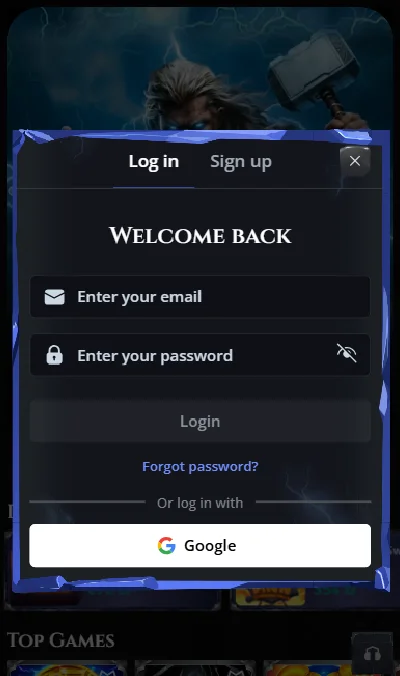
The Login button at ThorFortune appears in the same top-right position as the Sign Up button on desktop, and alongside account navigation options in the mobile interface. Clicking it opens a two-field form: email address and password. There are no alternative login methods - phone number login, username login, and social account sign-in are not confirmed as available options at ThorFortune based on published documentation.
After entering credentials and confirming, ThorFortune may request an additional verification step in certain regions or under specific conditions - for example, if the login is from an unrecognised device or location, or if 2FA has been enabled. Standard logins on a familiar device without 2FA active proceed directly to the casino lobby.
ThorFortune Login Page Location and How It Works
The ThorFortune login form is accessible from every page of the casino interface via the Login button in the top-right corner on desktop and via the account navigation area on mobile. There is no separate login URL - the form appears as an overlay or redirect on the main page. The form requires the email address used during registration and the corresponding account password. If autofill is available from the device's password manager and has stored ThorFortune credentials, it populates both fields automatically.
ThorFortune Remember Me: Stay Logged In Safely on Trusted Devices
The Remember Me checkbox on ThorFortune's login form maintains an authenticated session without requiring credential re-entry on subsequent visits to the same browser and device. This means closing the browser tab and reopening ThorFortune later that day - or the next day - resumes the session without a login prompt. The session duration for a remembered login is not specified in ThorFortune's published documentation.
Remember Me should only be checked on a private device that no other person uses. On a shared, public, or work device, a remembered casino session exposes the account to anyone who opens the browser. The security cost of convenience in that scenario is significant - if the account has a balance, an unintended user could initiate a deposit or bet without the account holder being present.
How to Set Up ThorFortune Two-Factor Authentication (2FA)?
If you have forgotten your ThorFortune password, the recovery process starts at the login screen. A "Forgot password" or equivalent link appears below the credential fields, which triggers the email recovery flow. ThorFortune's published documentation describes password recovery as email-based - a recovery link is sent to the registered email address, and clicking it allows the password to be reset. The exact label on the link and the layout of the recovery form were not captured in screenshots reviewed for this article, so the specific UI is described here based on published text sources rather than confirmed visual data.
The recovery email has a validity window - links in password reset emails typically expire after a short period, often 15-30 minutes depending on the platform. ThorFortune does not publish this duration explicitly. Acting on the recovery email promptly after it arrives avoids the link expiring before the reset is complete.
How to Reset Your ThorFortune Password via Email Recovery Link
Locate the password recovery option on ThorFortune's login screen, enter the email address registered to the account, and submit. Check the inbox of that address for ThorFortune's recovery message - including spam and promotions folders if it does not appear promptly. Open the email and click the password reset link. This should open a ThorFortune page with a form for setting a new password. Enter a new password that you have not used for ThorFortune or other casino accounts previously, confirm it, and save. After saving, the login screen accepts the new credentials immediately.
What to Do If You Cannot Access Your ThorFortune Account at All
If the recovery email does not arrive or the account is unreachable through normal recovery (for instance, if the registered email address itself has been lost or changed without updating the account), the resolution requires direct support contact. ThorFortune's live chat support team can verify account ownership through identity information and initiate a manual account recovery process. Having the original registration details - full name, date of birth, and country used during sign-up - ready for the support interaction speeds the verification. Email support at [email protected] handles the same request for players who cannot access the live chat.
ThorFortune Two-Factor Authentication (2FA): Setup and Security Benefits
Two-factor authentication at ThorFortune adds a second verification step to the login process. After entering the email address and password, a one-time code is required before the session opens. This code is generated fresh for each login, which means someone who has obtained the account password through a data breach, phishing, or credential stuffing attack cannot access the account without also having access to the verification device.
The realistic threat that 2FA addresses is not technical complexity - it is the straightforward risk of a reused or guessed password being tried against a ThorFortune account. Password reuse across services is extremely common, and breach databases containing email-password combinations are readily available to bad actors. An account with a balance and complete KYC documentation is a meaningful target. 2FA removes the password as the sole gate.
By way of observation: most casino account takeovers do not involve sophisticated attacks. They involve players who used the same email-password combination at ThorFortune as at another site where that combination was previously leaked. Enabling 2FA costs a few seconds per login and eliminates that entire category of risk. For accounts that hold real money or have withdrawal methods attached, the tradeoff is strongly in favour of enabling it.
Why Should You Enable 2FA on Your ThorFortune Casino Account?
The case for enabling 2FA at ThorFortune rests on two specifics of casino accounts: they hold a withdrawable real-money balance, and they have payment method details attached after KYC. A conventional email or social account taken over is inconvenient - a casino account taken over can result in the balance being withdrawn to a third-party wallet before the account holder realises what happened. 2FA blocks the attacker at the authentication step, regardless of whether the password is known. The inconvenience is one extra tap per login session; the protection is full resistance to credential-based takeover.
How to Set Up ThorFortune 2FA in Your Account Security Settings
Navigate to your ThorFortune account Profile section - accessible after login from the account menu - and open the Security settings sub-section. The two-factor authentication option appears there; enabling it presents setup instructions that typically involve linking an authentication app or confirming a phone number for SMS delivery of one-time codes. ThorFortune's specific 2FA method (app-based authenticator vs SMS) is not explicitly detailed in published source material - the Security settings screen in the live account provides the current options. Once set up, every subsequent login requires both the password and the one-time code before access is granted.
ThorFortune KYC Verification: What Documents Are Required and When
KYC - Know Your Customer - is the identity verification process that ThorFortune runs before processing a player's first withdrawal. It is a Curacao licensing requirement, not an optional step. Every player who requests a cashout at ThorFortune for the first time will encounter KYC, regardless of the withdrawal amount or method chosen.
Understanding ThorFortune's KYC requirement in context matters for calibrating expectations. At casinos without mandatory verification - some cryptocurrency-focused platforms skip it - players can withdraw without identity documentation, which removes a step but also removes the anti-fraud protection that prevents stolen identity accounts from being used for money laundering. ThorFortune's KYC requirement is standard for licensed operators and serves the player as well as the regulator: it confirms that winnings can only be paid to the verified account holder, preventing a third party from draining an account even if they obtain the login credentials. The one-time documentation step is the cost; permanent protection against unauthorised withdrawal is the benefit.
Tip: submit KYC documents as soon as possible after your first deposit - ideally before placing any bets - rather than waiting until you want to withdraw. Initiating the review early means it is likely complete by the time you are ready to cashout, eliminating the verification delay from the withdrawal timeline.
What Documents Does ThorFortune Require for KYC Identity Verification?
ThorFortune's KYC submission requires three categories of documentation. First, a government-issued identity document: a passport or national identity card with the player's full name, date of birth, and photograph clearly visible. Second, proof of current residential address: a recent utility bill, bank statement, or government letter dated within the past three months, showing the name and address matching the account registration. Third, proof of the payment method used for deposits: this typically means a photograph of the depositing card showing the cardholder name and card number (with the middle digits obscured), or a screenshot of an e-wallet account showing the player's name. For cryptocurrency deposits, the wallet address used is the relevant reference.
These three categories cover the standard KYC requirement. In some cases, ThorFortune may request additional verification - the selfie or video check described below - at its own discretion, particularly for larger withdrawal amounts or accounts that show unusual activity patterns.
How Long Does ThorFortune KYC Verification Take After Document Submission?
ThorFortune publishes a verification timeline of a few hours to 24 hours after all required documents are submitted correctly. The key qualifier is "correctly": blurry photographs, images where text is partially cut off, or documents where the name does not match the account registration data will generate a rejection and restart the timeline from the point of resubmission. Submitting high-quality, complete images the first time is the most effective way to keep the review within the published window.
Document review does not operate on weekends or outside business hours in some jurisdictions - though ThorFortune's published documentation does not specify hour-based restrictions. If a submission made late on a Friday has not been reviewed by Monday, contacting live chat to check the status is the practical next step.
ThorFortune Selfie Requirement: When Does the Casino Ask for a Photo with Your ID?
A selfie holding the submitted identity document - or in some cases a short video verification - may be requested by ThorFortune in addition to the standard document set. This is not automatic for every account: it appears to be applied selectively, at ThorFortune's discretion, based on account characteristics or the circumstances of the first withdrawal request. The selfie confirms that the person submitting the documents matches the document photograph, which is the final layer of identity confirmation beyond what static document images provide. If requested, clear lighting, a current photograph, and an ID document where the text is fully legible in the combined image are the conditions for a smooth review.
What Does ThorFortune Account Dashboard Contain?
The account dashboard at ThorFortune organises player-facing account management into three main sections: Profile, Wallet, and History. Each section covers a distinct area of account function, and together they handle everything from security settings to transaction records without requiring a support contact for standard management tasks.
The Profile section covers personal information, password updates, security settings including 2FA, loyalty program status tracking, responsible gambling limits, and the onboarding widget that guides new accounts through initial setup. The Wallet section handles financial activity: deposit and withdrawal buttons, a display of real-money versus bonus balance, and a withdrawal limit tracker showing how much of the daily and monthly ceiling has been used. The History section produces detailed reports on game sessions, bonus usage, financial transactions, and sports betting activity, with filters for date range and transaction type.
ThorFortune Wallet Interface: How to Deposit, Withdraw and Check Balance
The Wallet section is the operational centre of the account for financial activity. Selecting Deposit opens the payment method list; selecting Withdrawal opens the cashout form. The balance display in Wallet separates real money from active bonus funds - a detail that matters when assessing whether a withdrawal is immediately possible (real-money balance) or subject to wagering completion first (bonus funds). The withdrawal limit tracker within Wallet shows the remaining daily and monthly cashout allowance, so players with the EUR 1,000 daily ceiling can see exactly how much headroom remains before reaching it. For deposits and payment methods accepted for first deposit , the Wallet interface is the access point.
How to View Your Full Transaction History in ThorFortune Account
The History section produces records in three categories: gambling activity (game sessions, bet history), financial transactions (deposits and withdrawals with dates, amounts, and statuses), and sports betting records. These reports are available with flexible date filters, which makes it possible to pull a specific period's activity rather than reviewing the entire account history. The sports betting record appears alongside casino activity in the same History interface rather than as a separate sportsbook-only report, covering the unified account structure.
Transaction history serves a practical function beyond record-keeping: if a withdrawal is delayed or a bonus was not credited as expected, the transaction record provides the reference data - timestamp, amount, and status - needed to raise the issue accurately with support.
What Responsible Gambling Tools Are Available in ThorFortune Account?
ThorFortune's responsible gambling controls are self-managed from within the Profile section of the account dashboard. Players can set limits, adjust them within a cooling-off window, or request exclusion without contacting support. The tools cover three distinct intervention levels: preventive limits that cap activity in advance, a cooling-off break that suspends access temporarily, and self-exclusion that suspends or permanently closes the account.
All three tools are accessible from the same place in the account Profile, which means they are reachable at any point - including during a session when a player decides to stop. The system enforces limits automatically once set; they do not require manual re-activation each session.
How to Set Deposit and Loss Limits on Your ThorFortune Account
Deposit limits at ThorFortune can be configured for daily, weekly, or monthly periods. Once the limit is reached within the relevant period, the system blocks further deposits until the period resets. Loss limits work similarly, capping the amount that can be lost within a set period and stopping play when the ceiling is hit. Both types of limit are set within the gambling limits area of the Profile section.
Reducing an existing limit takes effect immediately at ThorFortune. Increasing a limit is subject to a cooling-off period - a delay between the request and the increase taking effect - which exists to prevent limit increases being made impulsively during a losing session. The specific cooling-off duration is not published in available documentation.
ThorFortune Self-Exclusion: How to Temporarily or Permanently Block Your Account
Self-exclusion at ThorFortune covers both short-term access suspension and indefinite or permanent account blocking. A temporary exclusion sets a specified period during which the account cannot be used - useful for players who want a defined break without closing the account permanently. A permanent exclusion blocks the account without a scheduled reopening date.
Requesting self-exclusion is done from the Profile section. Once a permanent exclusion is in effect, ThorFortune will not reopen the account, and any remaining real-money balance needs to be claimed before exclusion is finalised. Players who have self-excluded and then believe the exclusion was applied in error - or who wish to close the account fully rather than just suspend it - should contact support directly via live chat or email at [email protected] for guidance on their specific situation.
ThorFortune Promo Code at Sign-Up: How Registration Bonuses Work
ThorFortune's published documentation does not confirm the presence of a promo code field on the registration form itself. The known active codes - RELDAY for the Sunday Reload and 50HIGH for the Highroller Bonus - are cashier-level codes entered at the point of deposit rather than during sign-up. Whether a separate registration-time code field exists for new-player exclusive offers is not confirmed in the screenshots or documentation available.
This distinction matters practically: if a promotional code is only valid at registration and must be entered in the sign-up form, a player who registers first and tries to apply it in the cashier later will find it inactive. If codes are cashier-only, the order of operations is deposit-first, code-entry-second. Confirming which applies to any specific offer before registering is the correct approach, particularly for codes sourced from affiliate partner sites that may not specify where the code is applied.
Where Does ThorFortune Ask for a Promo Code - Registration or Cashier?
Based on available source data, ThorFortune promo codes are applied in the cashier deposit interface rather than in the registration form. The code field appears in the cashier before deposit confirmation, and codes like RELDAY and 50HIGH are confirmed as cashier-stage inputs. A promo code field in the registration form itself is not confirmed in published documentation or captured in available screenshots. If ThorFortune introduces registration-time codes for specific campaigns, those offers would specify in their terms where the code should be entered.
Which Promo Codes Can New ThorFortune Players Use on First Deposit?
New players at ThorFortune do not require a promo code to claim the three-part welcome package - the first, second, and third deposit bonuses activate automatically upon qualifying deposits without a code. The known codes - 50HIGH (Highroller Bonus, 50% up to EUR 500) and RELDAY (Sunday Reload, 25% up to EUR 100) - are designed for returning players rather than first-deposit new registrants. For the welcome package itself, no code is needed. Codes distributed through affiliate partner sites specific to new registrations should be verified with ThorFortune support or in the bonus terms before the first deposit to confirm they are active and applicable to a new account.
How to Delete or Close Your ThorFortune Casino Account
ThorFortune does not list a self-serve "delete account" button in its account dashboard based on available documentation. Closing an account at ThorFortune routes through self-exclusion settings (for temporary or indefinite suspension) or through a direct support request (for permanent account deletion with data removal under privacy policy terms).
Self-exclusion and account deletion are related but distinct. Self-exclusion suspends access and blocks marketing communications, but the account record remains in ThorFortune's system. Full account deletion - removal of personal data under GDPR or equivalent privacy rights - is a formal request that ThorFortune's support team handles rather than an automated self-serve function.
ThorFortune Permanent Self-Exclusion vs Full Account Deletion: Key Differences
Permanent self-exclusion at ThorFortune blocks all access to the account indefinitely. The account data remains on file for the period required by ThorFortune's legal and compliance obligations - typically years, due to AML record-keeping requirements. The player cannot log in, receive marketing messages, or make transactions, but the account technically exists.
Full account deletion requests the removal of personal data beyond what is required for legal retention purposes. This type of request is typically submitted in writing to ThorFortune's support or data protection contact. The response timeline and the scope of data removed depend on ThorFortune's privacy policy and applicable data protection law, which players in the EU or UK can enforce under GDPR or equivalent regulation. If data deletion is the goal rather than simply stopping play, a formal deletion request - rather than self-exclusion alone - is the correct route.
What Happens to Remaining Funds When You Close a ThorFortune Account?
Any real-money balance in the account must be withdrawn before a self-exclusion or deletion request is finalised. ThorFortune will not automatically return funds to a payment method when an account is closed - the player must initiate a withdrawal of the remaining balance through the cashier using a verified payment method. Active bonus funds that have not met wagering requirements are forfeited at account closure. Players should ensure their KYC verification is complete and a valid withdrawal method is on file before initiating closure, since completing those steps after an exclusion request may require additional support involvement.
When Account Management at ThorFortune Gets Complicated
Most account interactions at ThorFortune follow a straightforward path: registration takes a few minutes, login is a two-field form, KYC is a one-time document submission before the first cashout. The complications arise in edge cases, and they tend to cluster around two points: the email address used for registration, and the timing of KYC.
If the registration email address becomes inaccessible - the account is closed, the domain expires, or it is simply a long-forgotten address - password recovery and email verification for account changes stop working. ThorFortune does not have a published self-serve route for changing the registered email without verifying the old address first, which means a support contact is required to resolve it. For players using a personal email domain or a work address for registration, considering the long-term availability of that address is worth a moment's thought.
KYC complications arise when the documents submitted do not match the registration information. A name discrepancy - a middle name included in one place and omitted in another, or a married name vs. a birth name - is one of the most common causes of KYC rejection and delay. Submitting documents in the same name format used during registration avoids this category of problem entirely.
The ThorFortune Casino overview covers the platform's broader licensing, security, and product scope - which is the context in which the account management functions described on this page operate.
Account Ownership, in Practice
Everything in ThorFortune's account system - from the registration form to the withdrawal approval process - is built around verifying that one real person owns and controls each account. The registration fields, email confirmation, KYC documents, 2FA, and responsible gambling limits all connect to that same objective.
ThorFortune suits players who are comfortable completing a one-time document verification process before cashing out, who want 2FA available as a security option, and who prefer a self-contained account that handles both casino play and sports betting under a single login. The platform is less suited to players who want fully anonymous gambling without any identity verification, or who need to withdraw amounts larger than EUR 10,000 per month regularly under a standard account structure.
The practical starting point for anyone opening an account is to register with an email address they control long-term, enter name and birth date that match their ID documents exactly, and submit KYC documents on the same day as their first deposit - before any withdrawal is requested. That sequence eliminates the three most common account management friction points before they have a chance to appear.